Secure Keyboard Entry is a macOS feature in Terminal (and some other apps like iTerm2) that prevents other applications and processes from intercepting your keystrokes while you’re typing in that window.
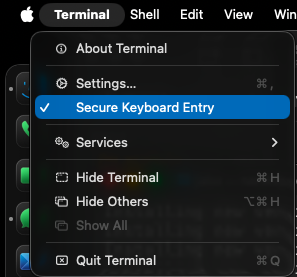
The problem it solves: macOS allows applications to monitor keyboard input system-wide — things like accessibility tools, clipboard managers, or even malicious software can potentially “listen” to what you’re typing anywhere on the screen. When you’re typing a password or sensitive command in Terminal, that’s a real risk.
How it works: When Secure Keyboard Entry is enabled, macOS routes your keystrokes through a protected path directly to Terminal, bypassing the standard event tap mechanism that other apps use to monitor input. Only the focused, trusted application receives your keystrokes.